
Download the Nagad88 APK: Latest Version 1.0 for Android 5.0 and Newer
- v1.0
- 6.5 MB
- Android 5.0+
- Free
The Nagad88 download for Android is a free 6.5 MB APK file, published by the brand on its official site and not in Google Play. The latest version is 1.0, and it installs on Android 5.0 Lollipop and newer, with Android 15 as the target version. A Nagad88 apps download of this size finishes quickly even on a weak mobile signal. Android then asks for permission to install a file from outside the store, and once that is done, the Nagad88 app opens with the same account you use on the website.
The download costs nothing, and there is no separate app bonus: the 100% Welcome Bonus up to ৳20,000 on a first deposit from ৳500 is the same in the app and on the site.
Nagad88 APK file details: size, version and Android support
The figures below belong to the file published on the official site, version 1.0 (build 1). The APK weighs 6,824,813 bytes, so it fits on budget phones with little free storage and does not eat into a small data pack.
- File type
- Android package (.apk)
- Package name
- com.nagad88.nagad88
- Version
- 1.0 (build 1)
- File size
- 6.5 MB (6,824,813 bytes)
- Minimum Android
- 5.0 Lollipop (API 21)
- Target Android
- 15 (API 35)
- Signature
- APK Signature Scheme v1 and v2
- File date
- Price
- Free
The price line deserves a second look. The free download has no paid tier, no subscription and no "premium" build, so a page that asks for money or a card number before giving you the file is not the brand.
Where the official download sits on the Nagad88 site
Nagad88 has no separate download page and no QR code. The file is reached from three spots on the official site, and which one you see depends on the device:
- On a desktop, a small app icon without any text in the site header leads to the download link.
- On an Android phone, a banner at the top of the mobile site reads "Download our APP Version now!" with a DOWNLOAD button next to it.
- In the mobile burger menu, the Download item points to the same file.
The server hands out the APK only to Android browsers. A computer gets a short web page instead of the file, and the top banner does not appear on iOS at all. The Download APK button on this page follows the brand's own link, and no copy of the file is stored on this site. Whatever route you take, the package that arrives should match the table above byte for byte.
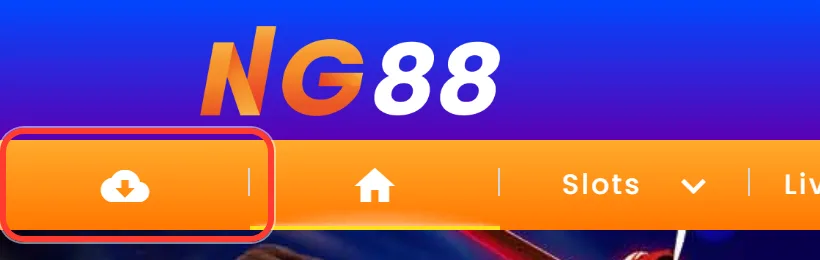
Desktop: the cloud icon left of Home in the header 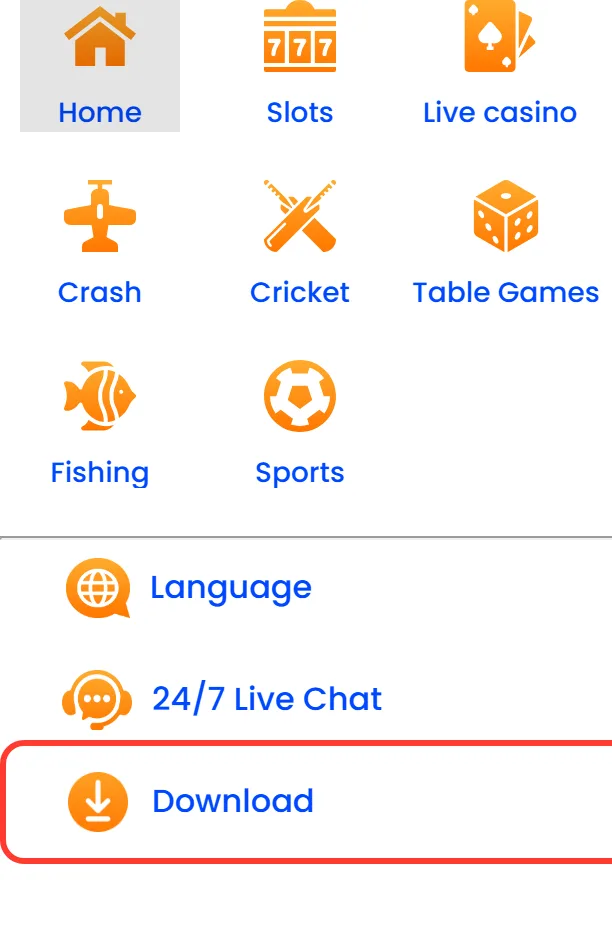
Mobile burger menu: the Download item under 24/7 Live Chat
How to download the APK on an Android phone in 6 steps
The whole Nagad88 APK download for Android happens in the phone browser. Chrome is used in the steps below; other browsers ask the same questions in their own words.
-
Open the link on your Android phone and tap Download APK, or tap DOWNLOAD on the banner of the mobile site.
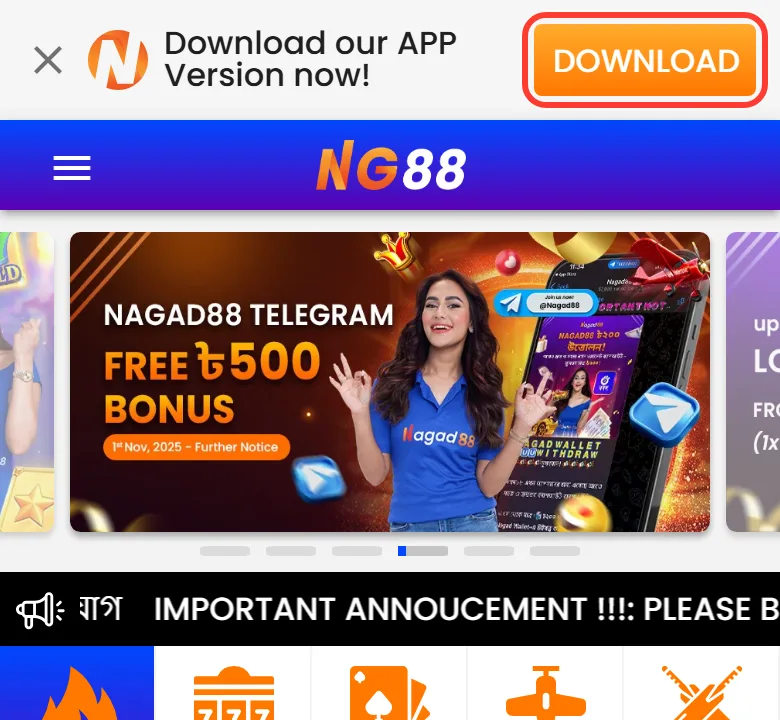
Step 1: the DOWNLOAD button in the top banner of the mobile site If the browser asks whether to keep a file of this type, confirm the download.
Wait until nagad88.apk (6.5 MB) finishes, then tap Open in the notification or find the file in the Downloads folder.
The first time, Android asks for permission to install apps from this source. Allow it, as described in the next section, and go back.
Tap Install and wait for the progress bar to complete.
Tap Open, or start Nagad88 later from the home screen or the app drawer.
If anything goes wrong between steps 3 and 5, the error table further down lists the usual messages.
Allowing installs from unknown sources on Android 5-7 and 8+
Android blocks files from outside Google Play, so the Nagad88 app for Android needs one permission before it installs. Where that switch lives depends on the Android version:
Phone makers rename these menus. On Samsung One UI, Xiaomi HyperOS or MIUI, Oppo and realme ColorOS and Vivo Funtouch OS, the switch may sit under Privacy, Security or Special app access.
Google Play Protect can show a warning for an app that did not come from the store. Keep Play Protect switched on and compare the package name and checksum from the next section before you decide to continue. After the install, turn the unknown sources permission off again; Android will ask for it once more when you install a newer file.
Check the file: SHA-256, MD5 and package name
Unofficial copies of the Nagad88 APK download sit on third-party sites, and a modified file looks exactly like the real one on the home screen. Three checks tell them apart.
The first is the checksum. These values match the file served on 20 October 2026, version 1.0 (build 1), dated 10 October 2026:
SHA-256: e2d6b73a3539dfb2a0705df3b088fd008ebafa3f11a192fa17a18ead6a76f7bb
MD5: bd6b2914518b297e2ed6a298bb177e86
On the phone, any free checksum app reads the SHA-256 of a file in Downloads. On a Windows computer, copy the file over and run certutil -hashfile nagad88.apk SHA256; on macOS or Linux, shasum -a 256 nagad88.apk does the same. If anything differs, delete the file and download it again from the official link.
The second check is the package name com.nagad88.nagad88, which a package viewer or checksum app shows. The third is the signature: the file is signed with APK Signature Scheme v1 and v2, and Android verifies it during install.
These values belong to build 1 only. A new build gets new checksums, so compare the version in your file with the current build described further down before you check the numbers.
Permissions the app asks for and why
Inside, the app is a WebView shell: it opens the Nagad88 mobile site and adds push notifications and fingerprint login on top. Its permission list follows from that. Some permissions are granted at install, others come as a prompt later, such as notifications on Android 13 and newer at first launch.
| Permission | What it is used for |
|---|---|
| Internet and network state | Loading the site inside the app |
| Notifications, vibration, start after reboot, foreground service | Messages about bonuses and promotions, also after the phone restarts |
| Fingerprint and biometrics | Quick login without typing the password |
| Approximate location | The region the phone is in, not precise GPS |
| Phone state, storage, advertising ID, install referrer | Counting installs and where they came from |
The last row is tracking. The APK includes the AppsFlyer, Firebase and OneSignal SDKs, which attribute installs and deliver notifications, so a Nagad88 app download for Android comes with the marketing analytics usual for a commercial app. Notifications can be switched off later in Android settings without any effect on login or the cashier.
Install errors and quick fixes
When the install stops halfway or Android refuses the file, the message on screen usually points to the cause:
| What you see | Cause | Fix |
|---|---|---|
| The file is about 2 KB and opens as a web page | Opened on a computer, so the server sent a 1,866-byte page | Open the link in the browser of the Android phone |
| "There was a problem parsing the package" | Broken download or Android below 5.0 | Check for 6,824,813 bytes and download again |
| "App not installed" | A copy with the same package name but another signature is installed | Uninstall that copy first |
| The Install button is blocked | Unknown apps permission not granted | Allow it for the browser |
| Not enough storage | Phone memory is full | Free space for the 6.5 MB file |
If none of these match, ask the 24/7 Live Chat on the official site or the Telegram channel t.me/nagad88official; the support team speaks Bangla.
Why the Nagad88 app is not on Google Play
A Nagad88 apps download from the Play Store is not possible: the brand publishes its Android app only as an APK on its own site. The official site has no Google Play or App Store links, so a store listing or a third-party APK site that borrows the name is not part of that route. For the same reason, updates do not arrive automatically. A newer APK from the site installs over the old one. This is why the package name and checksums matter more here than they would for a store app: they are the only way to confirm the file is the one the brand published. With no store listing there is no Play Store version history either: no old version to roll back to and no latest version waiting behind an Update button.
Nagad88 APK latest version: build 1, and no old versions published
The Nagad88 apps download latest version is 1.0 with build number 1, in the file the server dates 10 October 2026. It is also the only build the brand has made public. The official site keeps no changelog, no release notes and no page of earlier files, and nothing in the APK names a version before 1.0. The download link ends in ?v=2, but that parameter belongs to the web address, and the file behind it still reports 1.0.
So a search for a Nagad88 apps download old version ends on file-sharing sites, and any Nagad88 APK download old version found there cannot be traced back to the brand. Such a copy causes problems of its own:
Which version is installed, and how to get the latest APK
Android prints the version of every installed app on its App info screen. On Samsung One UI, Xiaomi HyperOS, Oppo or realme ColorOS and Vivo Funtouch OS the menu names may differ, but the path is similar: Settings > Apps (or App management) > Nagad88, then scroll to the bottom, where the version usually appears in small text. If it reads 1.0, the phone already runs the current build. A different number means either a newer official build or a file from another source, so compare it with the build the official link delivers today.
When a newer file appears on the brand's server, download the latest version from the official link and install it over the old one:
- Open the official download link on the Android phone and save the new file.
- Tap the file. With the same package name and signature, Android offers to update the installed app instead of adding a second icon.
- Allow installs for the browser again if you switched that permission off, tap Update, and turn the permission off when it finishes.
If Android refuses, uninstall the current app first, install the new file clean and log in again.
New games and offers arrive without a new APK
One build number does not mean the app falls behind. The APK is the WebView shell described in the permissions section, so the lobby, the cashier and the promotions load from the live site each time you open it. New slots from JILI or Pragmatic Play, a new crash title next to Aviator or cricket markets for the next BPL match reach the app as soon as they go live on the website. A new file matters only when the shell itself changes, for example for a new Android version, and until then there is no 6.5 MB download to repeat.
iPhone and computer: no APK, other routes
An APK runs only on Android, and the file has no iPhone or desktop edition. iPhone owners get no native app; the site installs as a web app from Safari through Share and Add to Home Screen, which is how Nagad88 apps on iOS are set up. On a Windows or Mac computer, the download link returns a small web page instead of the file, because the server sends the APK only to Android browsers. So the APK needs the phone itself, while computer players use the website in a browser.
First launch: notifications, login and fingerprint
The first time the app opens, phones on Android 13 and newer ask whether Nagad88 may send notifications. Allowing it brings messages about bonuses and promotions.
The Nagad88 app login uses the same username and password as the website, so an existing account needs no new registration. New players sign up inside the app in two steps: username and password first, then BDT as the currency and a +880 phone number. On phones with a sensor, the app supports fingerprint or biometric login.
Beyond the login screen, the Nagad88 casino app shows the same lobby as the mobile site: Slots, Live Casino, Crash games such as Aviator, Cricket and Sports. Deposits go through bKash, Nagad or USDT, and bonuses match the site, since no promotion is tied to installing the app.
Questions about the Nagad88 APK file
Is the Nagad88 APK free?
Yes. Downloading and installing the file costs nothing, and there is no paid version. Money only comes in when you make a deposit to play.
Is there a separate Nagad88 VIP download?
No. VIP is an account level that runs from Bronze to Black, not a different file. A Nagad88 VIP app download is the same APK as everyone else's, and the VIP status appears after you log in.
Is the Nagad88 app connected to the Nagad wallet?
The Nagad88 app is a separate product from the Nagad mobile financial service. Inside the cashier, Nagad is one of the payment methods, next to bKash for deposits and withdrawals and USDT for deposits.
How much mobile data does the app use?
The APK download for Android takes 6.5 MB once. After that the app loads the mobile site inside its shell, so slots and live tables use about as much data as they would in the browser.
What happens to my balance if I delete the app?
Nothing. The balance, bonuses and history are stored in your account, not on the phone. Reinstall the file or open the website, log in, and everything is where you left it.
Can I get an older build for Android 4?
No. There is no official build below 1.0, and version 1.0 needs Android 5.0 Lollipop or newer. On an older phone, open the Nagad88 mobile website in the browser, where the account and the cashier are the same.
How will I know a new version is out?
The brand publishes no release schedule or notes. The simplest check is the official download link: if the file it delivers shows a version other than 1.0 on the App info screen after install, a new build has arrived.
Can I send the APK to another phone?
Yes, the same file installs on any phone with Android 5.0 or newer. Before installing a copy received from a friend, compare its SHA-256 with the value above, since a forwarded file can be swapped on the way.